Overview
The MatchKraft API is asynchronous. Every operation — domain scanning, email validation, or email finding — runs as a background job. This means you get a response instantly while your data is processed in parallel, without waiting for results.
How it works
Submit a job
POST your records to the relevant endpoint.
Receive a jobId
The API responds immediately with a unique jobId.
Job processes in background
MatchKraft processes your records asynchronously.
Webhook fires on completion
Your configured webhook endpoint receives a notification with the jobId and status.
Fetch results
Use the jobId from the webhook to call the results endpoint and retrieve your data.
Webhook (recommended)
Configure a webhook URL in your dashboard. MatchKraft will POST to it the moment your job completes. Use the jobId from the payload to fetch results.
Polling
Alternatively, call the results endpoint periodically using your jobId until the status is COMPLETED.
Authentication
All API requests must include your API key as a request header. You can find your API key in your MatchKraft dashboard under Settings → API Keys.
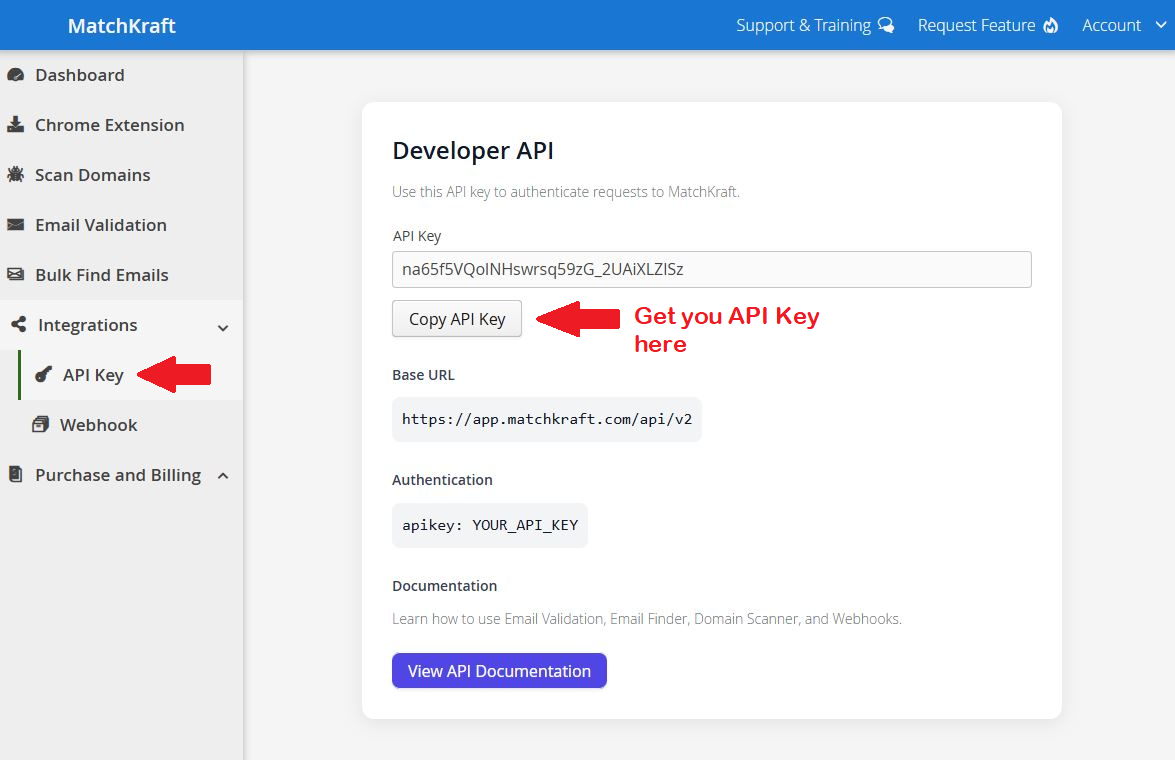
apikey: YOUR_API_KEYWhere to find your API key
Navigate to Integrations → API Key in your MatchKraft dashboard to copy your key and view the base URL.
Domain Scan
Scan one or more domains to extract verified B2B contact emails associated with each website. Submit a list of URLs and receive a jobId to track progress.
Submit job
curl --location 'https://app.matchkraft.com/api/v2/domain-scan' \
--header 'apikey: YOUR_API_KEY' \
--header 'Content-Type: application/json' \
--data '{
  "jobName": "Domain Scan",
  "records": [
    "https://example.com",
    "https://example2.com"
  ]
}'
Response
{
  "jobId": "20f70187-b941-4bb0-b10f-599b025fc425",
  "status": "RUNNING"
}
Store the jobId. You will need it to fetch results after your webhook fires.
Fetch results
Replace {jobId} with the value returned when the job was submitted. Call this after your webhook notifies you that the job is complete.
Email Validation
Validate one or more email addresses for deliverability, syntax, domain health, and spam-trap detection. Results include a verified status for each address.
Submit job
curl --location 'https://app.matchkraft.com/api/v2/email-validation' \
--header 'apikey: YOUR_API_KEY' \
--header 'Content-Type: application/json' \
--data '{
  "jobName": "Lead Generation Influencers",
  "records": [
    "john@gmail.com",
    "test@domain.com"
  ]
}'
Response
{
  "jobId": "20f70187-b941-4bb0-b10f-599b025fc425",
  "status": "RUNNING"
}
Fetch results
Call this once your job has completed. It returns an array with one object per submitted address — each with its status plus the detected mxRecord and mxProvider.
[
  {
    "email": "john@acme.com",
    "status": "Verified",
    "mxRecord": "acme-com.mail.protection.outlook.com",
    "mxProvider": "microsoft"
  },
  {
    "email": "contact@catchall-co.com",
    "status": "Verified/AcceptAll",
    "mxRecord": "aspmx.l.google.com",
    "mxProvider": "google"
  },
  {
    "email": "typo@acme.com",
    "status": "Invalid",
    "mxRecord": "acme-com.mail.protection.outlook.com",
    "mxProvider": "microsoft"
  }
]
Status values
Every address comes back with one of four verdicts — the same labels you see in the app:
| status | Meaning |
|---|---|
| Verified | Mailbox confirmed to exist and accept mail. |
| Verified/AcceptAll | Catch-all (accept-all) domain, but independent evidence confirms the address is real. |
| Invalid | The mailbox does not exist — safe to drop. |
| Unknown | Not enough signal to decide. We don't guess. |
Email Finder
Find verified professional email addresses for a list of contacts given their first name, last name, and company website. Each record in records is an object with those three fields.
Submit job
curl --location 'https://app.matchkraft.com/api/v2/email-finder' \
--header 'apikey: YOUR_API_KEY' \
--header 'Content-Type: application/json' \
--data '{
  "jobName": "Email Finder Job",
  "records": [
    {
      "firstName": "Arseniy",
      "lastName": "Grusha",
      "website": "https://dataprana.io"
    },
    {
      "firstName": "Randi",
      "lastName": "Zuckerberg",
      "website": "https://zuckerbergmedia.com"
    }
  ]
}'
Request fields
| Field | Type | Description |
|---|---|---|
| jobName | string | Human-readable label for the job. |
| records[].firstName | string | Contact's first name. |
| records[].lastName | string | Contact's last name. |
| records[].website | string | Company website URL. |
Response
{
  "jobId": "20f70187-b941-4bb0-b10f-599b025fc425",
  "status": "RUNNING"
}
Fetch results
Returns an array with one object per contact. When an address is found, email holds it and verificationType tells you how it was confirmed.
[
  {
    "firstName": "Arseniy",
    "lastName": "Grusha",
    "domain": "dataprana.io",
    "email": "arseniy@dataprana.io",
    "verificationType": "Verified",
    "mxRecord": "aspmx.l.google.com",
    "mxProvider": "google"
  },
  {
    "firstName": "Randi",
    "lastName": "Zuckerberg",
    "domain": "zuckerbergmedia.com",
    "email": "randi@zuckerbergmedia.com",
    "verificationType": "Verified/AcceptAll",
    "mxRecord": null,
    "mxProvider": "microsoft"
  },
  {
    "firstName": "Jane",
    "lastName": "Doe",
    "domain": "example.com",
    "email": "Unknown",
    "verificationType": null
  }
]
Verification types
| verificationType | Meaning |
|---|---|
| Verified | Address found and confirmed by a direct SMTP check. |
| Verified/AcceptAll | Catch-all domain — the address was confirmed via independent provider evidence. |
When no deliverable address is found, the email field is "Unknown" and verificationType is omitted.
Credits
Check how many credits you have left for each product. This endpoint is read-only — it does not consume credits — and the numbers always match what the job endpoints enforce.
Get credits
curl --location 'https://app.matchkraft.com/api/v2/credits' \
--header 'apikey: YOUR_API_KEY'
Response
{
  "status": "OK",
  "email": "you@company.com",
  "plan": "PREMIUM",
  "emailValidation": { "used": 1240, "limit": 25000, "remaining": 23760 },
  "emailFinding":    { "used": 310,  "limit": 5000,  "remaining": 4690 },
  "domainScan":      { "used": 52,   "limit": 5000,  "remaining": 4948 }
}
Response fields
plan— your current plan (FREE, STANDARD, PREMIUM, STANDARD_YEAR, PREMIUM_YEAR).emailValidation,emailFinding, anddomainScan— each reportsused,limit, andremainingfor the current billing period.- Calling this endpoint does not consume any credits.
Webhooks
Configure a webhook URL in your MatchKraft dashboard. When a job finishes, MatchKraft sends a single HTTP POST to that URL. The payload is intentionally minimal — it tells you which job completed, not the results themselves.
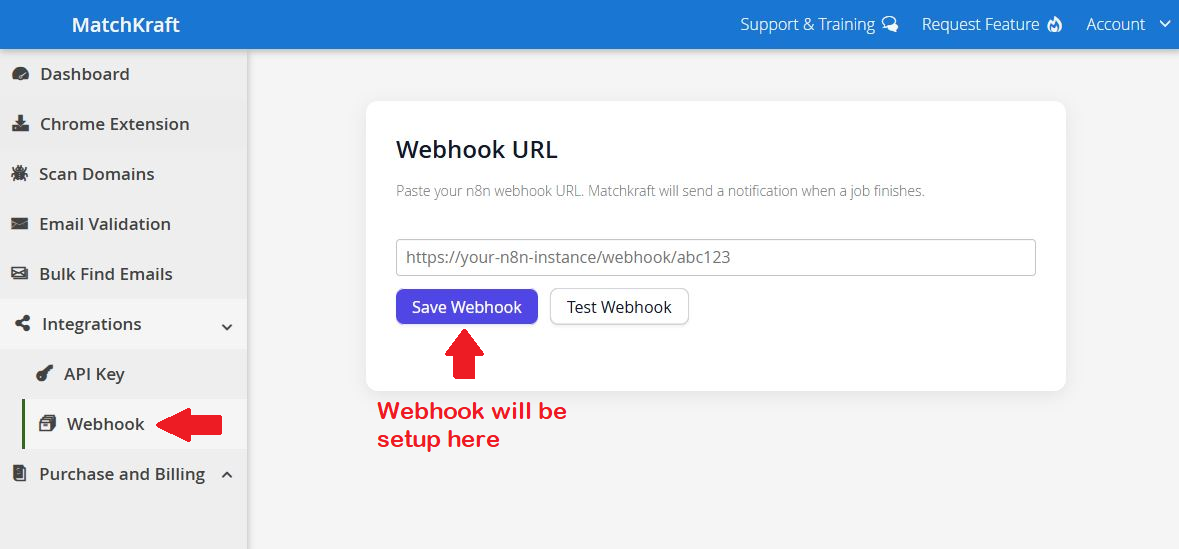
Setting up your webhook
Go to Integrations → Webhook in your dashboard, paste your endpoint URL, and click Save Webhook. Use Test Webhook to verify the connection.
What the webhook contains
- ✓jobId — the unique identifier of the completed job
- ✓event — always "job.completed"
- ✓jobType — which endpoint the job belongs to
- ✓status — COMPLETED or FAILED
- ✗Results data — NOT included. Fetch these separately using the jobId.
Webhook payload example
{
  "event": "job.completed",
  "jobId": "20f70187-b941-4bb0-b10f-599b025fc425",
  "jobType": "email-validation",
  "status": "COMPLETED"
}
After receiving the webhook
- 1Extract the jobId from the payload.
- 2Determine the endpoint from jobType (e.g. email-validation → /email-validation/results/{jobId}).
- 3Call the corresponding results endpoint with your API key.
- 4Process the results.
Webhook best practices
- Respond to the webhook with HTTP 200 immediately — process the jobId asynchronously.
- Implement idempotency using the jobId in case the webhook is delivered more than once.
- Validate that the incoming payload contains a recognized jobId before fetching results.
- Use HTTPS for your webhook endpoint to protect data in transit.
MCP Server
Connect Claude — or any MCP-compatible client — directly to your MatchKraft account. No separate integration to build: Claude calls Domain Scan, Email Finder, and Email Validation on your behalf, inside a normal conversation.
Claude Desktop
Go to Settings → Connectors → Add custom connector and paste this as the Remote MCP server URL, with your own API key in place of the placeholder:
https://mcp.matchkraft.com/mcp/<YOUR_API_KEY>Claude Code, Claude.ai web connectors, and other MCP clients
Clients that support custom headers connect to the base URL with a bearer token instead:
URL:     https://mcp.matchkraft.com/mcp
Header:  Authorization: Bearer <YOUR_API_KEY>
Available tools
Find B2B contact emails from company domains.
Find professional emails from names and companies.
Check email deliverability and validity.
Check the status of background jobs.
How it works
- Uses your MatchKraft account to authenticate requests automatically — no separate OAuth setup.
- Large lists are automatically batched and processed in the background.
- Results are returned directly to the MCP-compatible client.
Full walkthrough and video: MatchKraft MCP Server: Connect Claude to Your Account.